This HTML lesson plan can be used by high school teachers to teach students how to create basic websites. The lesson plan includes a brief history of HTML, an overview of why it’s important and exercises for students.
This lesson plan is designed as an introduction to this fundamental piece of Internet technology. To build on this lesson, consider teaching students about WordPress and other blogging systems that are commonly used to create and manage websites. At the end of this lesson, students will understand what HTML is, why it matters and some of its practical applications. The lesson can be used as a stand-alone or integrated into teaching a course on the Internet, media or technology.
Learning Objectives & Materials Needed
The suggested learning objectives for this HTML lesson plan are:
- Students will be able to describe what HTML is and its role in the Internet.
- Students will learn basic HTML tags
- Students will learn how to identify tags used in an actual website’s source code
To teach this lesson plan successfully, teachers should have access to the following materials:
- HTML reference book
- Computers for students to use
- Computer and computer projector (InFocus) to show websites and related materials to students
- Three to four reference websites that provide educational content and use effective HTML; (There are many educational websites produced by universities and governments that can be used for this purpose.)
- Assessment materials for students to complete (noted below)
What is HTML?
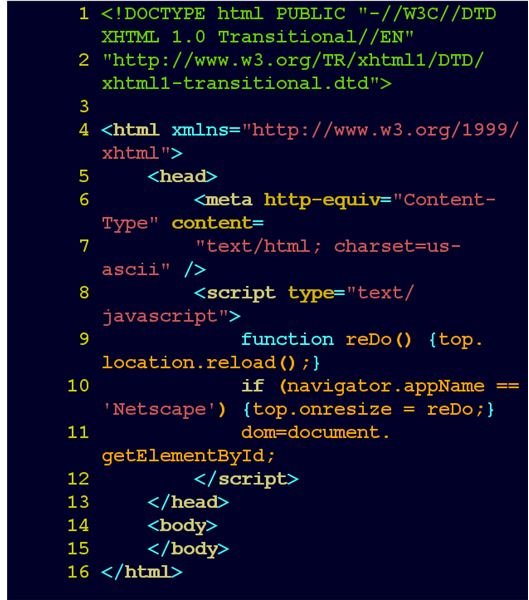
Use the information in this section to produce a hand-out on HTML to help students learn what HTML is and its role in the Internet. This HTML introduction and the presentation on HTML tags section are best presented by the teacher using a computer and projector or InFocus machine.
Definition: HTML (HyperText Markup Language) is a computer language that is used to format websites so that they can be read and displayed in web browsers such as Internet Explorer, Firefox, Safari, Chrome and Opera.
History: HTML was invented in 1990 by British physicist Tim Berners-Lee in Switzerland to help scientists organize their research and communicate with each other. Along with a few other key technologies such as FTP and TCP/IP, HTML is essential to the modern Internet.
Use: As a “mark up language,” it is considerably easier to learn than more technical computer languages such as C, Perl and Java. Without HTML, there would be no easy way to link websites together and the Internet would likely have remained a tool mainly used by scientists, researchers and engineers.
HTML Tags
To prepare students to use HTML effectively, provide information on HTML tags and examples of the source code behind a few websites.
- HTML tags can be used to format text, add links to other websites, create lists and other parts of websites. There are many different HTML tags available. Here are some of the most common HTML tags that students can use:
This tag can be used to bold text.
AdvertisementThis tag can be used to underline text.
This pair of tags can be used to create a list.
AdvertisementThe HTML tag is required to properly format any website.
The TITLE tag determines what appears at the top of the web browser.
Advertisement
Student Activities & Assessment
Based on the material covered in this lesson, several types of assessment can be used to determine how well students have learned the material. Alternately, these assessment activities can be assigned as homework or in class activity. If students do not have access to a computer and the Internet at home, be prepared to suggest alternatives such as using the school library, the local public library or school computer lab.
- HTML Tags Quiz: Provide a list of HTML tags and ask students to identify what the tags do (e.g. “The tag is used to bold text”).
**
HTML Errors Quiz: Provide students with the source code of an actual website but introduce a number of errors into the code. Students will then be marked on whether they identify and correct the errors.
Create a Basic Web Page Class Activity (Advanced): In this class activity, students create a basic web page using the HTML tags covered in the lesson. In order for students to properly complete this web page, ensure students have a full list of required tags needed to create a website. This activity will likely take several class periods to complete and may be submitted at the end of the unit. This activity could also be competed for a culminating project grade.
Advertisement
Resources
To further develop your HTML lesson plan for the needs of your students, consult these resources.
The Basics of HTML, https://www.tjhsst.edu/~dhyatt/superap/basic.html
HTML Coding, https://www.uwec.edu/help/html.htm
HTML Tutorial, https://www.w3schools.com/htmL/ (includes hands-on resources to build websites)
Image Credit: Wikimedia Commons/AzaToth
**